ISBN Barcode (International Standard Book Number)
The International Standard Book Number is based on the EAN13 barcode with a prefix of "978". This is the barcode that is used to uniquely identify books. It is also called the "Bookland" barcode. From 1st January 2007, all new publishers will be assigned ISBN with the new "979" prefix. Existing publishers are assigned the "978" prefix until the numbers are exhausted.
Generating this barcode using the Barcode Generator
The easiest way to create this barcode is to use the Barcode Generator included in the installation package. Simply goto the Start Menu and launch Aeromium Barcode Fonts > Barcode Generator. This software automates and simplifies the creation of the barcodes for you. After the barcode is created, you can simply copy and paste the barcode into your documents.Generating this barcode using the Barcode Generator
Generating this barcode in Excel
ISBN Barcode Fonts
The following is the list of fonts with varying heights supported by Aeromium.
FontCodeEANH1.ttf
FontCodeEANH2.ttf
FontCodeEANH3.ttf (Default Font)
FontCodeEANH4.ttf
FontCodeEANH5.ttf
FontCodeEANH6.ttf
The following is the list of fonts that support the Extended version of the ISBN barcode.
FontCodeEANEH1.ttf
FontCodeEANEH2.ttf
FontCodeEANEH3.ttf (Default Font)
FontCodeEANEH4.ttf
FontCodeEANEH5.ttf
FontCodeEANEH6.ttf
Using this Barcode Manually
The ISBN barcode uses a Parity table to generate the barcode and the computation of the barcode font characters involves certain amount of complexity. It is thus recommended to use the Barcode Generator or Excel Add In to generate the barcodes instead of creating them manually.Sample Barcodes
To encode the data "978345678912" for the ISBN barcode, simply key in "978345678912" in the Barcode Generator. The output is as follows :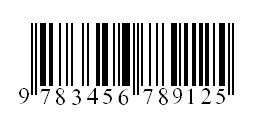
Back to Barcode Fonts.