UPCA Barcode (Universal Product Code A)
Universal Product Code version A is a 12-digit barcode for uniquely identifying a product and its manufacturer. This barcode was orginally developed for use in North America and was later expanded for worldwide use as the EAN13 barcode.
Generating this barcode using the Barcode Generator
The easiest way to create this barcode is to use the Barcode Generator included in the installation package. Simply goto the Start Menu and launch Aeromium Barcode Fonts > Barcode Generator. This software automates and simplifies the creation of the barcodes for you. After the barcode is created, you can simply copy and paste the barcode into your documents.Generating this barcode using the Barcode Generator
Generating this barcode in Excel
UPCA Barcode Fonts
The following is the list of fonts with varying heights supported by Aeromium.
FontCodeUPCH1.ttf
FontCodeUPCH2.ttf
FontCodeUPCH3.ttf (Default Font)
FontCodeUPCH4.ttf
FontCodeUPCH5.ttf
FontCodeUPCH6.ttf
The following is the list of fonts that support the Extended Style of the UPCA barcode.
FontCodeUPCEH1.ttf
FontCodeUPCEH2.ttf
FontCodeUPCEH3.ttf (Default Font)
FontCodeUPCEH4.ttf
FontCodeUPCEH5.ttf
FontCodeUPCEH6.ttf
Using this Barcode Manually
The UPCA barcode uses a Parity table to generate the barcode and the computation of the barcode font characters involves certain amount of complexity. It is thus recommended to use the Barcode Generator or Excel Add In to generate the barcodes instead of creating them manually.
Sample Barcodes
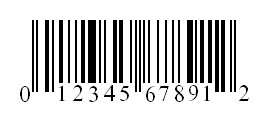
To encode the data "01234567891", simply key in "01234567891" in the Barcode Generator. The output is as follows :
Selecting the Extended Style results in the following barcode :
Back to Barcode Fonts.